X11 on iOS
A guide on how to compile the X Window System for iOS
Please read
This work has been picked back up recently, with KDE, GNOME, Wayland, and more. Read about it here: https://maxleiter.com/blog/xios
I'm excited to announce that X11 is coming soon to iOS. Most (see below) packages and dependencies for a fully functioning X11 desktop system have been compiled and are available on Cydia for iOS 11+. All packages have been compiled for arm64 and have been tested on iOS 12.4 and iOS 13.1. This requires a jailbroken device.
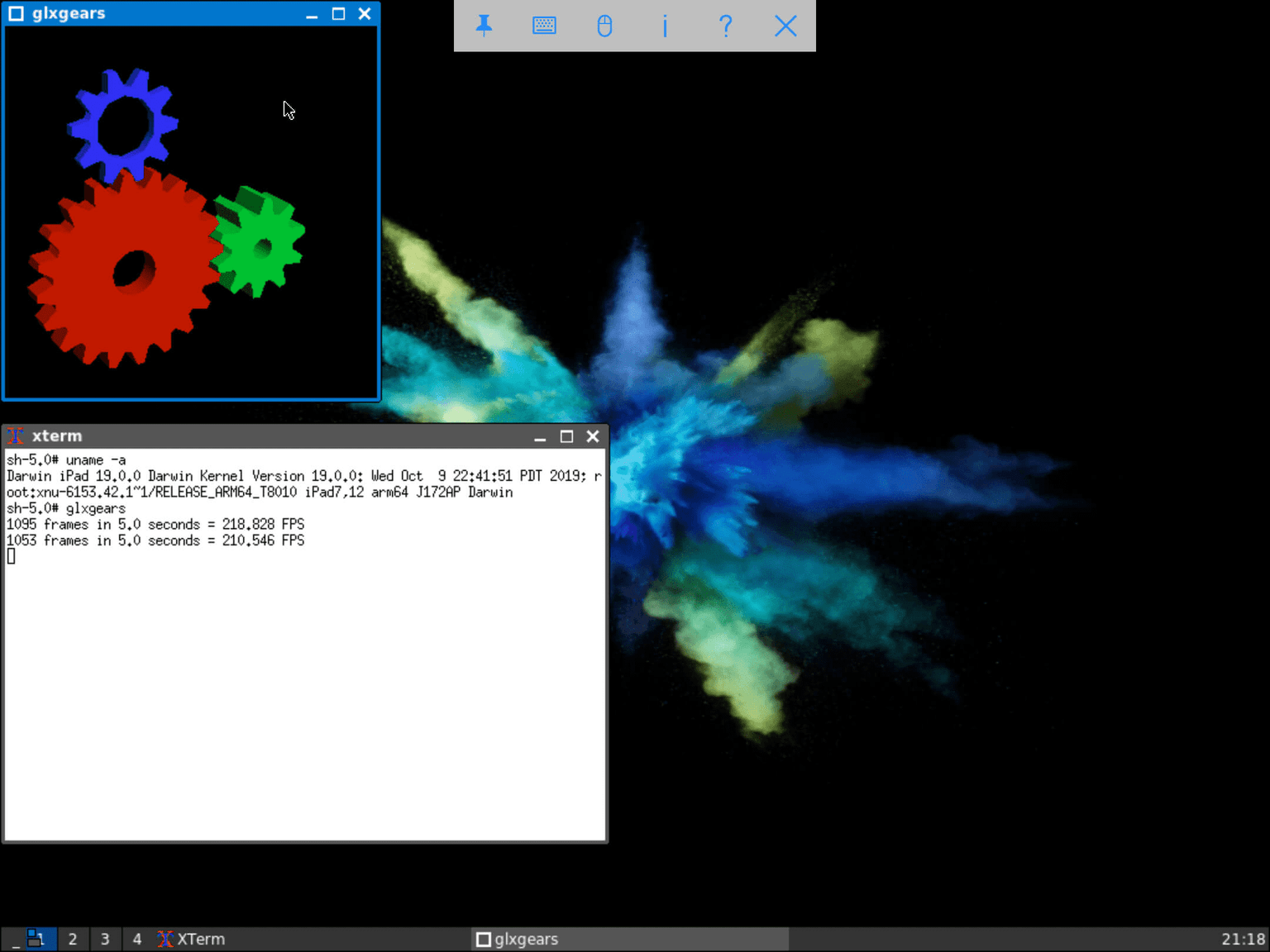
Image of programs running on device.
This site will serve largely as documentation for building yourself. You can add the Cydia repo below for the deb packages. Please let me know if you run across any issues with the debs; it's likely I messed up including a library or something like that. (These aren't done just yet.)
How it works
At the moment, a virtual screen is accessed via a VNC client to an Xvnc instance running on the iDevice. If you're unfamiliar, Xvnc is an X server with a virtual screen that can be accessed via VNC. The best part of this is no drivers are required: it's all handled by Xvnc.
Why
Largely just because I can. Also, I want to turn my iPad into a proper development environment, and a windowing system helps with that. It's a powerful machine with a Unix-like OS, so X11 seemed like a reasonable project. X11 allows running arbirtary applications like browsers and IDEs, assuming you can make them compile.
Current Features
- X11 on iOS via Xvnc
- Working window managers (jwm / twm / fluxbox)
- Text editor (adie)
- Image editor (azpainter)
- OpenGL (via Mesa)
- Loads of other libraries, tools, and applications.
Building instructions
Before you start, be sure to have an iOS SDK located at `/usr/share/iPhoneOS.sdk` for sbingner's llvm-10 to function. You can get the SDKs from theos.
The following tools/libraries are required to build the packages (unless you choose to build these yourself):
From MCApollo's repository:
- Gettext
- Glib
- libffi
- libxml2
- m4
- OpenSSL
- perl
- PkgConfig
- libiconv
- Python @ 3.7
- readline
- zlib
- clang-10
- Darwin CC Tools
- Bison
- Flex
- libstdc++ (C++ Standard Library symlink)
- automake
- autoconf
- ninja
- libpng
- gperf
In general, you can follow the instructions from Beyond LinuxFromScratch. This project is based on 9.0, with version differences or code modications marked with ⚠️ below. Applications and libs marked with ❗️ means unavailable on iOS or I was unable to build them. Empty notes means compiles and works as-is from BLFS. Additionally, all of the packages are available (generally as dylibs) on the Cydia repo linked above.
| Name | Version | Notes |
|---|---|---|
| util-macros | 1.19.2 | |
| xorgproto | 2019.2 | |
| libXau | 1.0.9 | |
| libXdmcp | 1.1.3 | |
| xcb-proto | 1.13 | |
| libxcb | 1.13.1 | |
| Freetype | 2.10.1 | |
| Fontconfig | 2.13.1 ⚠️ | Requires modifying stdlib.h in SDK to allow system calls. Bug with patch available here. |
| xtrans | 1.4.0 | |
| libX11 | 1.6.9 | |
| libFS | 1.0.8 ⚠️ | Need to remove some code from the libtool file. The enviroment variables aren't populated on iOS so a generated bash command is wrong. Check the output of ./configure to pinpoint the line number. |
| libICE | 1.0.1 | |
| libSM | 1.2.3 | |
| libXScrnSaver | 1.2.3 | |
| libXt | 1.2.0 | |
| libXmu | 1.1.3 | |
| libXpm | 3.5.13 | |
| libXaw | 1.0.13 | |
| libXfixes | 5.0.3 | |
| libXcomposite | 0.4.5 | |
| libXrender | 0.9.10 | |
| libXcursor | 1.2.0 | |
| libXdamage | 1.1.5 | |
| libfontenc | 1.1.4 | |
| libXfont2 | 2.0.4 | |
| libXft | 2.3.3 | |
| libXi | 1.7.10 | |
| libXinerama | 1.1.4 | |
| libXrandr | 1.5.2 | |
| libXres | 1.2.0 | |
| libXtst | 1.2.3 | |
| libXv | 1.0.11 | |
| libXvMC | 1.0.12 | |
| libXxf86dga | 1.1.5 | |
| libXxf86vm | 1.1.4 | |
| libpciaccess | 1.0.12 ❗️ | Unsupported OS |
| libdmx | 1.1.4 | |
| libxkbfile | 1.1.0 | |
| xcb-util | 0.4.0 | |
| xcb-util-image | 0.4.0 | |
| xcb-util-keysyms | 0.4.0 | |
| xcb-util-keysyms | 0.4.0 | |
| xcb-util-renderutil | 0.3.9 | |
| xcb-util-wm | 0.4.1 | |
| xcb-util-cursor | 0.1.3 | |
| Mako | 1.1.0 | If you can't build yourself, try using pip |
| Mesa | 0.52.1 ⚠️ | Set DRI drivers to swrast and set gallium drivers to empty. I manually modifed meson_options.txt. Also symlink m4 to /opt/local/bin/gm4. I had to remove an APPLE check in /src/mesa/main/texcompress_s3tc_tmp.h so it used the GL library instead of the macOS OpenGL one. Also, be sure to specify a minimum iOS version so thread-local support works with something like -miphoneos-version-min=11.2. |
| xbitmaps | 1.1.2 | |
| iceauth | 1.0.8 | |
| luit | 1.1.1 | Run sed -i -e "/D_XOPEN/s/5/6/" configure |
| mkfontdir | 1.0.7 | |
| mkfontscale | 1.2.1 | |
| sessreg | 1.1.2 | |
| setxkbmap | 1.3.2 | |
| smproxy | 1.0.6 | |
| x11perf | 1.6.1 | |
| xcursorgen | 1.0.7 | |
| xdpyinfo | 1.3.2 | |
| xev | 1.2.3 | |
| xhost | 1.0.8 | |
| xinput | 1.6.3 | |
| xkbcomp | 1.4.2 | |
| xkbevd | 1.1.4 | |
| xkbutils | 1.0.4 | |
| xkill | 1.0.5 | |
| xlsatoms | 1.1.3 | |
| xlsclients | 1.1.4 | |
| xmessage | 1.0.5 | |
| xmodmap | 1.0.10 | |
| xpr | 1.0.5 | |
| xprop | 1.2.4 | |
| xrandr | 1.5.1 | |
| xrdb | 1.2.0 | |
| xrefresh | 1.0.6 | |
| xset | 1.2.4 | |
| xsetroot | 1.1.2 | |
| xvinfo | 1.1.4 | |
| xwd | 1.0.7 | |
| xwininfo | 1.1.5 | |
| xwud | 1.0.5 | |
| startup-notifcation | .12 | |
| xterm | 351 | |
| FLTK | 1.3.5 ⚠️ | Need to remove some -U__APPLE__ calls. Disable tests in Makefile. |
| tigervnc | 1.10.1 ⚠️ | No vncviewer. Disable it via CMake. Remove the if(NOT APPLE) check above the add_subdirectory(unix). Also remove the find_package(FLTK) check and remove the line add_subdirectory(tests) (as some tests require FLTK). It's important to build tigervnc before building Xvnc. |
| Xvnc | 1.10.1 ⚠️ | Add a fake Xplugin.h to fool /unix/xserver/miext/rootless. Modify rootlessWindow.c to check for "Xplugin.h" instead of <Xplugin.h>. Also, remove the -z, now characters from /unix/xserver/hw/vnc/Makefile.in, where it's assigning libvnc_la_LDFLAGS. |
| Glib | 2.62.4 ⚠️ | Disable cocoa and carbon support in build.meson. Had to fake crt_externs.h. Remove the if host_system == 'darwin' check in glib/meson.build. |
| LuaJIT | 2.1.0 | https://github.com/rweichler/luajit-ios |
| OpenJPG | 2.3.1 | |
| poppler | 0.84.0 | |
| check | 0.11.0 | |
| pango | working on it | |
| EFL | 1.23.3 | working on it |
| compton | git v0.1 beta g316eac0 | |
| FOX toolkit | 1.7.67 | Contains Adie (text editor), a calculator, and Shutterbug (screenshots) |
| azpainter | 4bf18c8 |
*This post was originally written on the old maxleiter.com, and formatting has slightly adjusted